2010年1月6日 星期三

Blood


I went to donate my blood on New Year's Day.
---
The special is that I only donated platelets instead of whole blood.
---
They did it by a centrifuge machine.
---
Although I took some calcium tablets in case of the side effects of anticoagulant, my lips were still a little numb.

2010年1月4日 星期一

wxPython (1)

1.Beginning

接下來試著用 wxPython 來開發 GUI 吧!
先產生一個最陽春的視窗,
#-*- coding: utf-8 -*-
#!/usr/bin/python

import wx

if __name__ == "__main__":
    app = wx.App()
    frame = wx.Frame(None, -1, 'wxPython Test')
    frame.Show()
    app.MainLoop()
沒看錯,真的十行有找。
執行的結果,
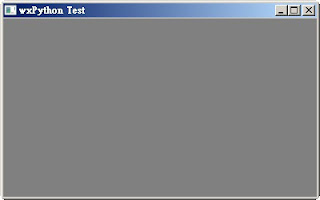


這個視窗還有很多參數可以設定,
wx.Frame有一些method可以調整視窗的大小和位置。
  • Move(wx.Point point)
  • MoveXY(int x, int y)
  • SetPosition(wx.Point point)
  • SetDimensions(wx.Point point, wx.Size size)
  • Centre()
  • Maximize()
  • Minimize()
以上是使用 wx.Frame 這個基本框架類別產生出來的視窗,
那如果要在裡面加上其他控制項呢?
我們就要繼承這個類別,
所有的初始化就可以寫在__inti__()裡面。
#-*- coding: utf-8 -*-
#!/usr/bin/python

import wx

class myFrame(wx.Frame):
    def __init__(self, parent, id, title):
        wx.Frame.__init__(self, parent, id, title, (400,300))
        self.Show()
if __name__ == "__main__":
    app = wx.App()
    frame = myFrame(None, -1, 'wxPython Test')
    app.MainLoop()
執行的結果跟上面是一樣的。

2.Menu Bar

加 menu bar 的作法。

#!/usr/bin/python
# -*- coding: utf-8 -*-
import wx

class myFrame(wx.Frame):
    def __init__(self, parent, id, title):
        wx.Frame.__init__(self, parent, id, title, (400,300))
        
        menubar = wx.MenuBar()
        
        file = wx.Menu()
        file.Append(1, 'New', 'New a file')
        file.Append(1, 'Quit', 'Quit application')
        
        edit = wx.Menu()
        edit.Append(3, 'Copy', 'Copy')
        edit.Append(4, 'Paste', 'Paste')
        
        menubar.Append(file, '&File')
        menubar.Append(edit, '&Edit')
        self.SetMenuBar(menubar)
        
        self.Centre()
        self.Show()
        
if __name__ == "__main__":
    app = wx.App()
    frame = myFrame(None, -1, 'wxPython Test')
    app.MainLoop()
首先要先建立一個 MenuBar 物件,
menubar = wx.MenuBar()
接著建立 Menu
file = wx.Menu()
然後把 Menu 放到 MenuBar 裡面。
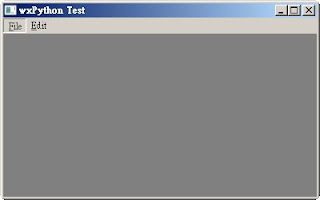
執行出來就像這樣。


在 append menu 的時候,&符號是用來建快速鍵,
當我們按 Alt 鍵,menu 的第一個字母就會出現底線,
此時我們可以接著按那個字母當作快速鍵,例如 Alt + F 或是 Alt + E。


當點了某一個 menu,會產生一個 event,
當然我們必須手動把這兩個東西 bind 在一起。
#!/usr/bin/python
# -*- coding: utf-8 -*-
import wx

class myFrame(wx.Frame):
    def __init__(self, parent, id, title):
        wx.Frame.__init__(self, parent, id, title, (400,300))
        
        menubar = wx.MenuBar(wx.MB_DOCKABLE)
        
        file = wx.Menu()
        file.Append(1, 'New', 'New a file')
        file.Append(1, 'Quit', 'Quit application')
        
        edit = wx.Menu()
        edit.Append(3, 'Copy', 'Copy')
        edit.Append(4, 'Paste', 'Paste')
        
        menubar.Append(file, '&File')
        menubar.Append(edit, '&Edit')
        self.SetMenuBar(menubar)
        
        # Bind menu with an event
        self.Bind(wx.EVT_MENU, self.OnQuit, id=2)
        
        self.Centre()
        self.Show()
        
    def OnQuit(self, event):
        self.Close()
        
if __name__ == "__main__":
    app = wx.App()
    frame = myFrame(None, -1, 'wxPython Test')
    app.MainLoop()
注意 bind 的地方跟 OnQuit 這個 method 就是響應 menu 這個 event。

以上都是固定的 menu ,那如果要產生 popup menu 呢?
#-*- coding: utf-8 -*-
#!/usr/bin/python

import wx

class MyPopupMenu(wx.Menu):
    def __init__(self, parent):
        wx.Menu.__init__(self)

        self.parent = parent

        minimize = wx.MenuItem(self, wx.NewId(), 'Minimize')
        self.AppendItem(minimize)
        self.Bind(wx.EVT_MENU, self.OnMinimize, id=minimize.GetId())
        
        close = wx.MenuItem(self, wx.NewId(), 'Close')
        self.AppendItem(close)
        self.Bind(wx.EVT_MENU, self.OnClose, id=close.GetId())

    def OnMinimize(self, event):
        self.parent.Iconize()

    def OnClose(self, event):
        self.parent.Close()
        

class myFrame(wx.Frame):
    def __init__(self, parent, id, title):
        wx.Frame.__init__(self, parent, id, title, (400,300))

        menubar = wx.MenuBar(wx.MB_DOCKABLE)
        
        file = wx.Menu()
        file.Append(1, 'New', 'New a file')
        file.Append(2, 'Quit', 'Quit application')

        edit = wx.Menu()
        edit.Append(3, 'Copy', 'Copy')
        edit.Append(4, 'Paste', 'Paste')
        
        menubar.Append(file, '&File')
        menubar.Append(edit, '&Edit')
        menubar.Append(MyPopupMenu(self), 'pop')
        self.SetMenuBar(menubar)

        #Bind menu with an event
        self.Bind(wx.EVT_MENU, self.OnQuit, id=2)

        #Bind right-button down event
        self.Bind(wx.EVT_RIGHT_DOWN, self.OnRightBtnDown)

        self.Centre()
        self.Show()

    def OnRightBtnDown(self, event):
        self.PopupMenu(MyPopupMenu(self), event.GetPosition())
        
    def OnQuit(self, event):
        self.Close()

if __name__ == "__main__":
    app = wx.App()
    frame = myFrame(None, -1, 'wxPython Test')
    app.MainLoop()
有注意到嗎?
在 OnRightBtnDown 這個 method 裡面,
我們呼叫 PopupMenu ,傳進去的第一個參數是一個繼承 wx.Menu 的物件,
當然也可以是一個 wx.Menu 物件喔!
也就是說,我們也可以這樣寫:
def OnRightBtnDown(self, event):
    #self.PopupMenu(MyPopupMenu(self), event.GetPosition())
    self.Bind(wx.EVT_MENU, self.OnTest, id=5)
    test = wx.Menu()
    test.Append(5, 'test', 'test')
    self.PopupMenu(test, event.GetPosition())

def OnTest(self, event):
    self.Close()

2010年1月3日 星期日

第一次分離術捐血

在這次捐血之前累積的捐血次數是4次,
說來真不可思議,
捐血本來是我覺得這輩子最不可能做的事情之一,
因為我長久以來體重過輕,and
我~好~怕~打~針~啊~~~
結果,結果,
那天看到送電影票我就毫不猶豫地衝上捐血車惹XD

很多事情就是這樣,
做了第一次之後就不再那麼害怕,
所以後來又努力捐了3次。

好吧,
我承認才4次我就有點膩了,
想換點不一樣的,
那就......分離術捐血吧......

什麼是分離術捐血呢?
以下參考台灣血液基金會網站:

什麼是分離術捐血?

這是一種特殊的捐血方式,是將捐血人的血液抽出,在密閉無菌的離心缽內,
藉由血液分離機分離出血小板或血漿等血液成分;其他成分如紅血球立刻送回捐血
人體內。因為此法可反覆操作,以獲取濃厚之血液成分,所以捐血時間較長,需要
預約且必須使用分離機設備,目前大致在捐血中心、捐血站和捐血室才能提供這項
服務。

分離術捐血分為那幾種?

(1)分離術血小板
(2)減除白血球分離術血小板
(3)分離術血漿
(4)分離術血小板兼收血漿等。

目前只接受(1)與(2)兩種。

簡單說就是把血液抽出後,
分離出血小板、血漿等成份,
然後把剩下的送回捐血者體內。

看起來還不錯,
趕快上網survey一下,
不看還好,
看了才讓人退卻,
有人說分離術的針比捐全血的粗,
也有人說抗凝血劑會造成嘴唇麻痺,噁心,想吐等副作用,
這這這............這個時候,
有一個念頭,
給了我前進的力量。

我想到了我洗腎的奶奶。
洗腎一樣是把血液抽出後,
濾除尿毒及多餘的水分等廢物,
然後把剩下的送回洗腎者體內,
當然目的原理都跟捐血不一樣,
但是我想到以奶奶八十幾歲的虛弱身體,
都可以承受一個禮拜三次的洗腎,
那以我近三十歲逐漸發福的身體,
怎麼有藉口說害怕?
所以,我就義無反顧地決定獻出我的第一次囉!

(說服力不夠嗎?
想當年金剛狼全身骨頭被注入亞德曼金屬,
那針頭才是嚇死人的粗勒,
他都不怕了,
我怎麼會怕呢?哈哈哈...我不會怕的啦...哈哈哈......)
 
元旦護士應該都去升旗了吧,
只好隔天早上打電話去捐血室預約,
OK,約了下午三點,可是兩點半就要先去做一些檢查,
中午不能吃太油膩避免乳糜血(肯德雞是昨天的事應該沒關係吧!?),
下午兩點半多到了捐血站,
程序都一樣,
然後我說我想捐分離術血小板兼收血漿,
得到的答案居然是現在沒有這一項,因為不缺血漿XDD(謎之音:這樣就少一點惹)
護士看我緊張到嘴唇都發白了,
還建議我先捐全血500c.c.試試看,
下次再捐分離術血小板,
當然不行啊,
我期待好久了。

那麼要先抽一管血做檢查,
一看到針頭我就後悔了,
為什麼快樂的生活不過,
要來做這麼可怕的事情啊???
我好怕打針啊啊啊......

抽完了血還要驗尿,
很好,一切正常(其實很擔心 brunch 的 bagel ,炒蛋,培根,德國香腸會太油說,但是護士說以後還是不要吃這些),
坐上椅子,
先吞三顆鈣片,
減緩抗凝血劑的副作用。

新店捐血室的護士小姐們真的都很好,
拿了兩個熱水袋給我握,
過程中很關心我的狀況,
也很詳細地跟我解釋分離術捐血的原理。

經過了七次循環(所謂一次循環就是抽出,分離,回送,一次大約400~500c.c.),
完成了這次捐血,
一切都比想像中的順利喔:)

後記:

捐分離術到底會不會不舒服呢?
我想這是因人而異,
我第一次回送還沒有什麼感覺,
到了第二次以後就開始感到嘴唇微麻,
當然越後面越麻,
不過最後一次的感覺記不得了,
因為我已經沉浸在百萬大歌星裡面,
辛隆的模仿秀真是太妙了,
我笑得不能自己,
連護士都過來關心到底什麼東西那麼好笑(囧)
超丟臉的...

最後還是要鼓勵看到此文的兄弟姊妹們,
挽起您的袖子,捐出您的熱血,
想想我們的血對需要的人來說是救命之血,
那扎個兩針又算得了什麼?
所以,我還是會繼續去捐血的,
而且我要好好照顧身體,
睡眠正常,清淡飲食,盡量運動,
保持血液的品質,
謝謝大家。

2009年12月31日 星期四

byte of python 小筆記

 
雖然已經寫過一些小程式,
最近還是強迫自己把"byte of python"看了一次,
看看是不是有什麼遺漏的部份。

1. 不定參數

python 也有不定參數的用法,
其中分為 list 和 dictionary

#!/usr/bin/python
# Filename: total.py
def total(initial=5, *numbers, **keywords):
    count = initial
    for number in numbers:
        count += number
    for key in keywords:
        count += keywords[key]
    return count

print(total(10, 1, 2, 3, vegetables=50, fruits=100))


其中,
10, 1, 2, 3會被當成 list 傳進函式中,
而
vegetable=50, fruit=100會被當成 dictionary 傳進函式中。

2. Tuple

Tuple 跟 list 很類似,但是功能沒有那麼多,最重要的差異是,tuple 是不可變的 (immutable),
定義 tuple 的方式是用小括號對 (parentheses)

zoo = ('python', 'elephant', 'penguin')

那麼如何定義空的或是只有一個元素的 tuple 呢?

# 空的tuple:
myempty = ()

# 只有一個元素的tuple:
singleton = (2, )

3. Set

python內建的資料結構除了 list, tuple,dictionary 外,
還有一種就是 set。

set裡面沒有順序,每個元素也沒有數量,
而最好用的莫過於集合的交集,聯集,差集之類的運算。

4. The format Method

有時候我們需要把字串跟一些資訊結合在一起,format 是很好的方法。

age = 25
name = 'Swaroop'
print('{0} is {1} years old'.format(name, age))
print('Why is {0} playing with that python?'.format(name))

進階用法 :
>>> '{0:.3}'.format(1/3) # decimal (.) precision of 3 for float
'0.333'
>>> '{0:_^11}'.format('hello') # fill with underscores (_) with the text
centered (^) to 11 width
'___hello___'
>>> '{name} wrote {book}'.format(name='Swaroop', book='A Byte of Python')
# keyword-based
'Swaroop wrote A Byte of Python'


5. Object Oriented (class)

self 就等同於C/C++中的 this 指標。

==
而__init__就等同C/C++中的建構子,
    __del__就等同C/C++中的解構子。

這兩個 method 都是自動被呼叫的,
其中__init__當然是物件建立時會被呼叫,
__del__是當物件不再被使用時會被呼叫,
但是不保證何時__del__會被呼叫,
所以我們也可以強制使用 del 來呼叫它。

==
python 的類別也有 static method,
有兩種用法
一種是像一般 method 一樣宣告,
但呼叫時加上 staticmethod(),例如

def howMany():
    '''Prints the current population.'''
    print('We have {0:d} robots.'.format(Robot.population))
howMany = staticmethod(howMany)

另一種是宣告時就加上裝飾字 (@staticmethod)

@staticmethod
def howMany():
'''Prints the current population.'''
print('We have {0:d} robots.'.format(Robot.population))


==
在 python 中,
所有的 class members 都是 public,而所有的 class methods 都是 virtual,
那如果需要 private 的 class member 呢?
只要在變數前加兩個底線就可以了,
像是 __privatevar 。

==
python 是支援多重繼承的,
在繼承的情況下,
如果有找不到的 method,
它也會往 base class 去找喔。

6. Pickle Module

有一個沒用過的東東,pickle,
pickle可以把任何物件存成檔案,
當然也可以從檔案載入,
哇屋,這真是超有用的 :)

#!/usr/bin/python
# Filename: pickling.py

import pickle

# the name of the file where we will store the object
shoplistfile = 'shoplist.data'
# the list of things to buy
shoplist = ['apple', 'mango', 'carrot']

# Write to the file
f = open(shoplistfile, 'wb')
pickle.dump(shoplist, f) # dump the object to a file
f.close()

del shoplist # destroy the shoplist variable

# Read back from the storage
f = open(shoplistfile, 'rb')
storedlist = pickle.load(f) # load the object from the file
print(storedlist)


7. Logging Module

當我們想把一些除錯訊息輸出到檔案時,
這個模組就非常好用了。
只要給檔案路徑跟基本設定就可以了。

#!/usr/bin/python
# Filename: use_logging.py
import os, platform, logging
if platform.platform().startswith('Windows'):
    logging_file = os.path.join(os.getenv('HOMEDRIVE'),
    os.getenv('HOMEPATH'), 'test.log')
else:
    logging_file = os.path.join(os.getenv('HOME'), 'test.log')

logging.basicConfig(level=logging.DEBUG,
     format='%(asctime)s : %(levelname)s : %(message)s',
     filename = logging_file,
     filemode = 'w',
)
logging.debug("Start of the program")
logging.info("Doing something")
logging.warning("Dying now")


8. List Comprehension

這真的是很"技巧性"的寫法。

listone = [2, 3, 4]
listtwo = [2*i for i in listone if i > 2]
print(listtwo)


9. 其他

exec, eval, repr (這三個不寫,考驗我的記憶)

2009年12月27日 星期日

寫程式與切蔥花

 
C/C++一直是我吃飯的工具,
從唸書到工作都是。

有時候也會去接觸沒碰過的程式語言,
例如研究所時摸過一點Perl,
受訓時看過一些PHP,
工作之後有看過Java,
前些時候則寫了一些Python......
(意思就是這些東西都如過客般,曇花一現,現在已經不知道忘到哪裡去了)

有人看到就會覺得我好上進,
願意花時間和精力去學習工作以外的東西,
覺得我很適合走這一行。
我有碰過對程式很有興趣,也很有天份的傢伙,
可是我不是。

也許只是好奇心作祟,
想看看不同的語言之間有什麼差異性。
也許只是懶人天性,
想說先學說不定以後會用到,就不用再學了。
也可能是異想天開,
以為學了什麼殺手級的語言,
可以靠它接案子,賺外快。

但是我對它真的沒不那麼有興趣。
我只是想做好份內的事情,
coding是我份內的事情,所以我要努力做到最好,
就這樣而已。
假設我今天是機車行師傅或是餐廳的廚師,
我也會把相關技能練到純熟。

最近蔥很便宜,一大把才30塊新台幣。
因為知道蔥的冷凍保存法,
所以就去買了一把,
然後很高興地回家處理。
那一個下午,
揀蔥,洗蔥,切蔥,
現在冰箱冷凍庫都是我處理好的蔥段和蔥花(哈),這樣其實也很快樂。
跟寫程式比起來,
說不定我比較喜歡切蔥花(泣)。

2009年12月24日 星期四

每天充滿,即是訓練(轉載)

每天充滿,即是訓練

這篇文章喚起了我沉睡已久的記憶。
在關西受訓時,
有一次上課,
講師說了一段話:

成功不是靠天份,而是靠每天執行該做的事。

"每天"何其重要,卻又何其困難。
需要極大的毅力及堅持,
能做到者必能歡喜收穫。

2009年12月21日 星期一

送阿媽的最後一程

傳統上,長孫是要"捧斗"。
告別式那一天,我坐在靈車的前座,
腳上放著"斗",雙手緊緊環繞。

車一邊開,要一邊跟奶奶說:
我們要出發囉...要轉彎囉...要過橋囉...阿媽跟好喔...阿媽不要怕...我們快到囉...
好像抱著的是一個小嬰兒。

是啊,當初剛到這個世界上時,
奶奶就是這樣抱著我的吧,
就是這樣諄諄提醒的吧。
現在,奶奶離開這個世界,
換我用同樣的方式抱著她,輕聲提醒。

止不住的眼淚一直持續到告別式結束。

附註(2009/12/17告別式,10天前奶奶放下了一切痛苦)